Library spec (draft)
Listeners with hundreds of books find the next one in seconds, follow their series in order, and keep what they don't want to see right now out of the way.
This is a proposal. Once something ships, it moves into the product spec and leaves this page.
Problems
- The books of a series are scattered and out of order. #1748
- I can't put my books in the order I want. #1543
- Fixing the author or the series means editing the files. #1407
- I can't take a book out of my library without deleting its files. #3397
- My library is one long list, with thousands of books from Audiobookshelf, or the kids' books next to mine. #1214
- The episodes of a radio play all look the same, and search can't find one by its number. #3132
- My author folders don't make authors, and a series folder becomes one long book. #3162
What Voice knows today
- Every book has a title, author, narrator, genre, series and part. The library only shows the title and the author, and search only lists books.
- Series and part rarely arrive. Voice reads them from Audiobookshelf and from MP3 tags written one particular way. M4B, FLAC and OGG files lose them, and so do MP3 files from the usual taggers.
- A book of one file is named after its album. 160 episodes with the album "Die drei ???" all get that name, and their own titles are neither shown nor searched.
- The author is the artist tag. It often holds the narrator, several names,
<Unknown>, or one person spelled two ways. - Folder names never become an author or a series. With "Folders are authors", a series folder in an author's folder becomes one long book.
- Only the title and the cover can be changed, and only for books on the device. Voice never writes tags.
- Current and Completed are in the order they were last listened, Not started yet by title. There's no sorting, filtering or hiding.
So: group by series, not by author. A series is short and ordered by its parts. Authors are messy, most of them have a single book, and a group per author makes the list longer, not shorter. Authors get their own screen instead.
But most series aren't in the tags. They're in the album or in the folders, so Voice reads them from there, and fixing many books at once has to take a few taps.
Ground rules
- The library stays one calm screen. Nothing new to learn for a listener with ten books.
- It stays quick with 5,000 books and a series of 200 episodes.
- No book gets lost. Search always finds grouped and hidden books.
- Edits never touch the files or the server.
- Grouping series needs no setting.
1. Series in the library
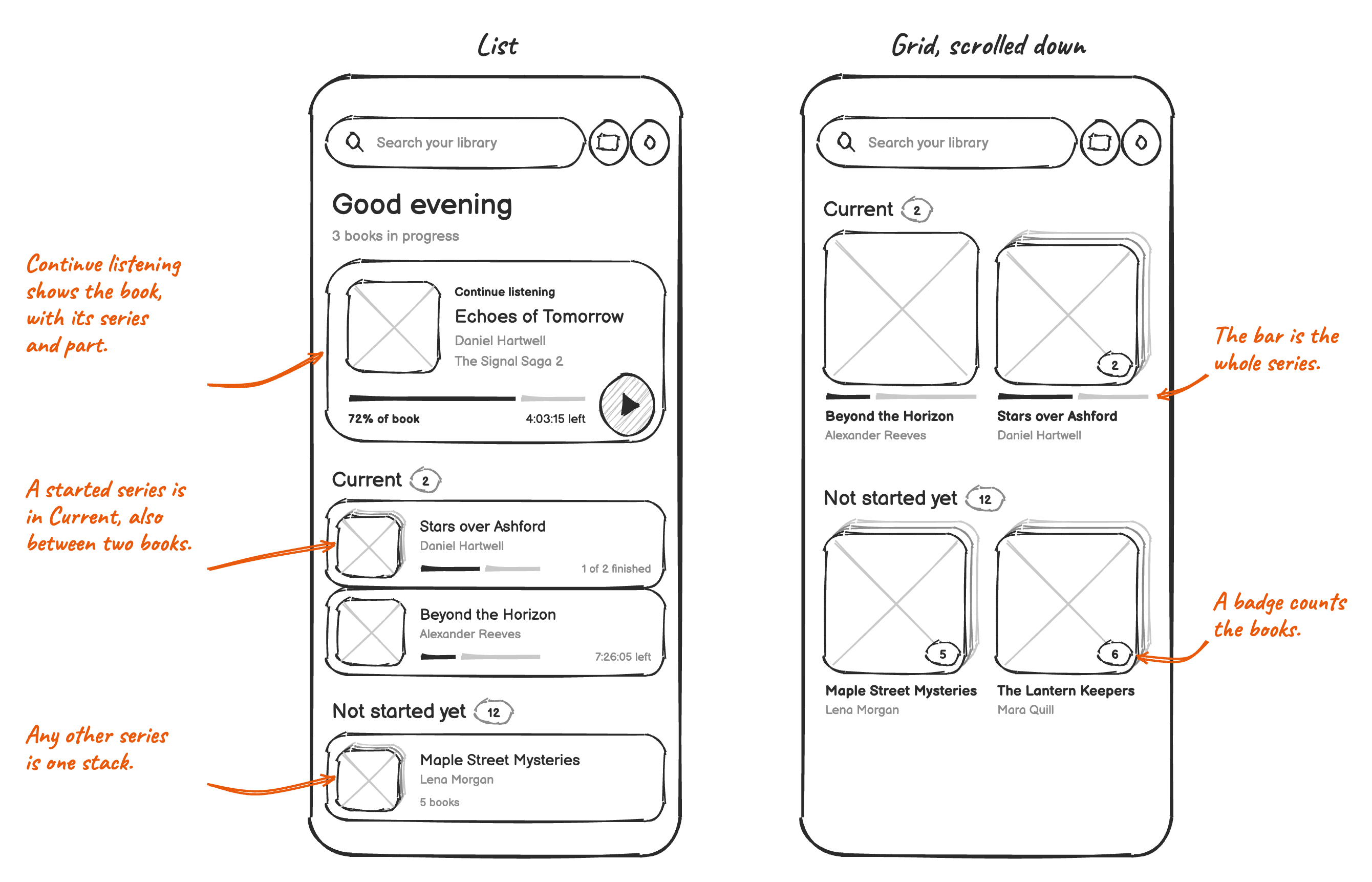
- Two or more books of a series show as one stack, in the list and in the grid. A single book of a series shows as a book.
- The stack has the series' name, its author and the cover of the book that's next. The list says how many books there are, or how many are finished, and the grid counts them in a badge on the cover. The bar of a started series shows how much of the whole series is listened.
- A book in progress stands for its series. It shows on its own, with its series and part, and the other books of its series don't show in the library. Two books of one series in progress are both in Current.
- A series with no book in progress is a stack: in Not started yet before its first book, in Current between two books, and in Completed after its last.
- A tap on a stack opens the series. A long press renames or hides it.
2. The series
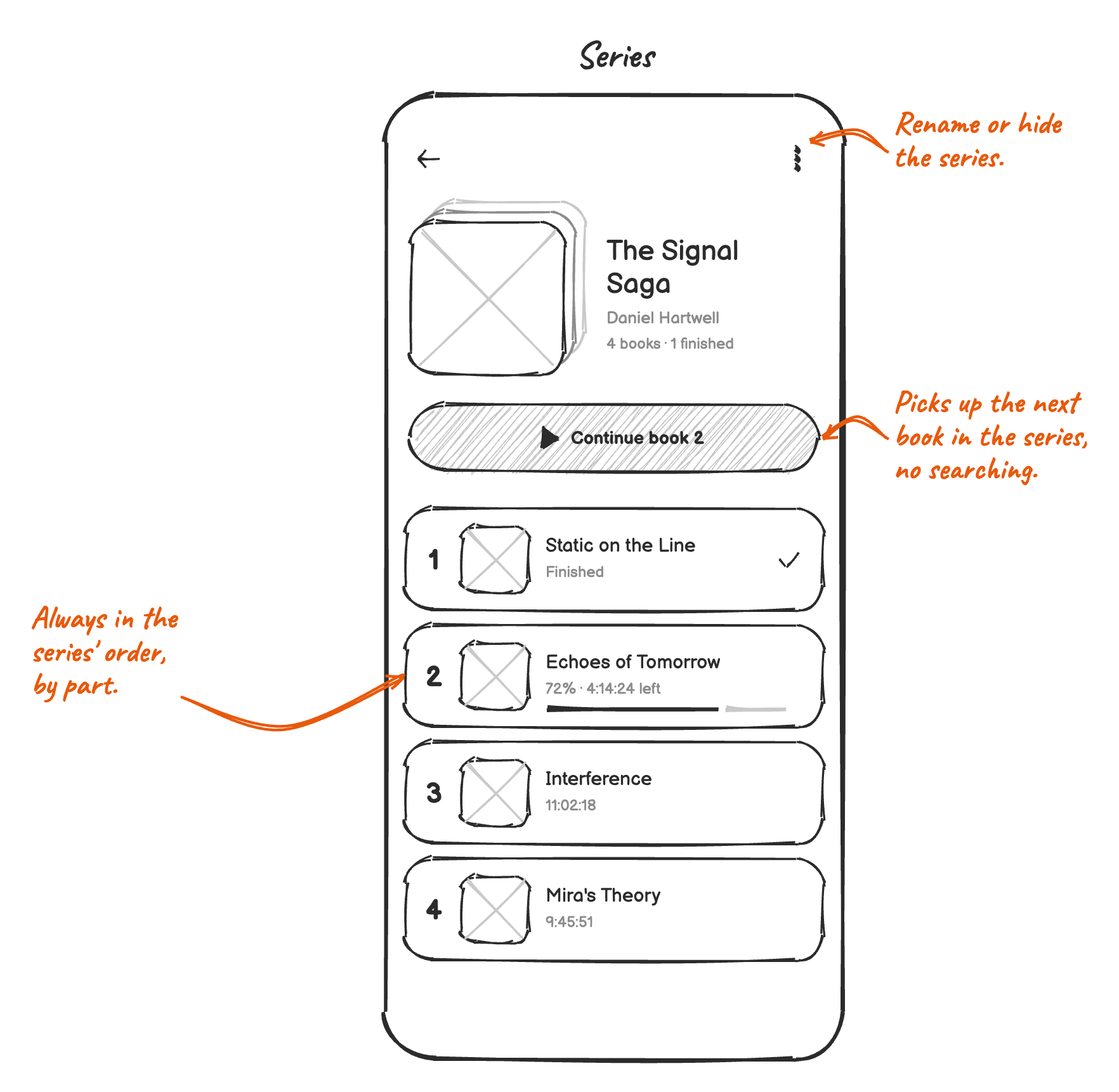
- The cover stack, the name of the series, its author and how many books are finished.
- One button continues the book in progress, or starts the first book that isn't finished.
- Books in the order of their parts. Books without a part come after them, in the order of their folder or file names, with 2 before 10. That's where most libraries keep the number, like "Book 4 - The Ruin.m4b" or "Folge 063".
- More options rename the series for all its books, or hide it. Picking a suggested name joins the two series.
- Opens from a stack, from a book's series in the player and the book actions, and from search.
3. The author
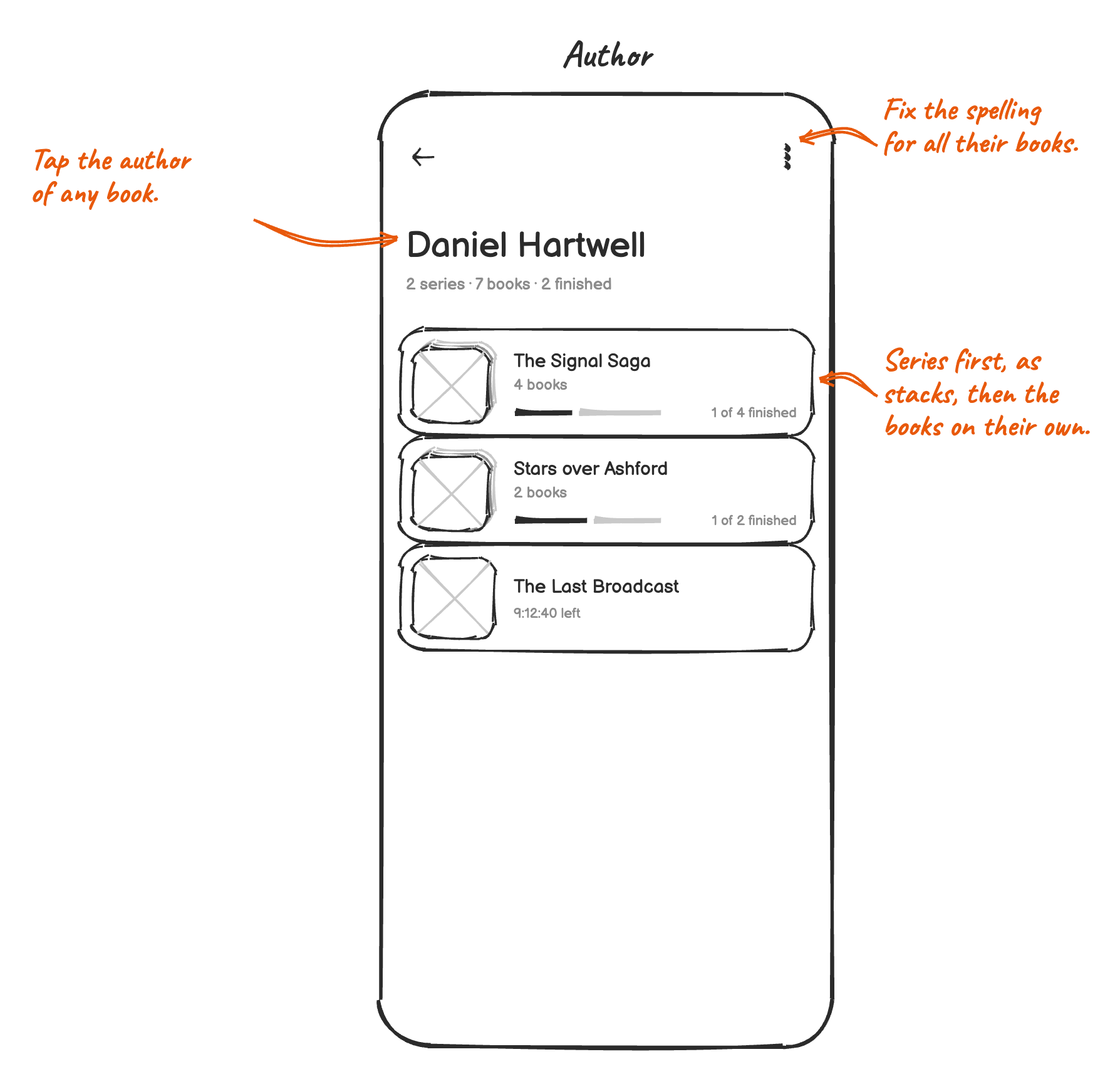
- The author's name, how many series and books they have, and how many are finished.
- Their series first, as stacks, then their other books by title.
- Names that only differ in case, spaces or punctuation are one author, like "jk Rowling" and "J. K. Rowling", shown in the spelling most of their books have. Series names match the same way.
- More options rename the author for all their books. Picking a suggested name joins the two, like ten books of "Rowling, J. K." and ten of "J. K. Rowling".
- Opens from a book's author in the player, the book actions and the series, and from search.
4. Where series and authors come from
An edit in Voice comes first, then Audiobookshelf and the tags, then the folders, and last the album.
- Tags:
MVNMandMVIN, andSERIESandSERIES-PARTlike Audiobookshelf reads them, in MP3, M4B, FLAC and OGG files. - Authors: the artist tag, or the album artist when there's none. "Unknown" and
<Unknown>count as no author. With "Folders are authors", the folder is the author of books whose tags have none. The tags come first, because some listeners use this mode for folders like "Kids" or "Crime". - Album: books of one file in the same folder that share an album are a series named after the album, and each is named after its own title. 160 episodes called "Die drei ???" become one stack, with episodes like "Folge 63: Monster-Wolken" in it. Albums like "Unknown" or "Audiobook" don't count, and a book whose title is only a number or like "Track 01" keeps the album's name.
Series folders
With "Folders are authors", every folder in an author's folder is one book today. Rowling/Harry Potter/ is one book
of over 100 hours, even when it holds seven book folders. The folder preview already spots these and says
"Looks like 7 books".
Such a folder becomes a series when it holds no audio files itself, and at least two of its folders hold audio and aren't named like discs. Each of those folders is a book with everything in it, in the order of their names. Anything else stays one book, like today. The preview uses the same rule.
A disc is a number on its own or after CD, Disc, Disk, Tape, Side, Part, Teil or Vol, like "07", "CD 2", "My Book - Disc 02" or "Part 3", or a name that starts with CD, Disc or Disk and a number, like "CD1 - The Beginning". These are the names the preview knows today, plus the last kind.
Where a book begins and ends only follows the folders, never the tags. A changed tag never splits or joins books, the
preview shows the result without reading the files, and it's the layout Audiobookshelf uses: Author/Series/Book/CD 1.
When in doubt, it stays one book. A long book can still be listened to, but a book that was split by mistake can't be
joined again. That's why "Part 3" counts as a disc.
In Author/X/ |
Result |
|---|---|
The Swarm/01.mp3, 02.mp3 |
One book |
The Swarm/CD 1/, CD 2/, Scans/ |
One book |
The Swarm/CD1 - The Beginning/, CD2 - The Escape/ |
One book |
Harry Potter/1 Philosopher's Stone/, 2 Chamber of Secrets/ |
A series of two books |
Harry Potter/1 Philosopher's Stone/CD 1/, CD 2/ |
Book 1 holds both CDs |
Discworld/Discworld 01/, Discworld 02/ |
A series of two books |
Harry Potter/Part 1/, Part 2/ |
One long book, like today |
The Swarm/Part 1 - The Beginning/, Part 2 - The Escape/ |
A series, by mistake |
For books already in the library:
- The first scan after the update splits these books without asking.
- Bookmarks and the listening history move to the book their file is in, and the position to the book that was playing, like when a folder's mode changes today.
- New: the books before the one that was playing are marked Completed, and the new books keep the date the long book was added.
- A name or cover set on the long book is lost, because the new books take their names from their files.
5. Sorting and filtering
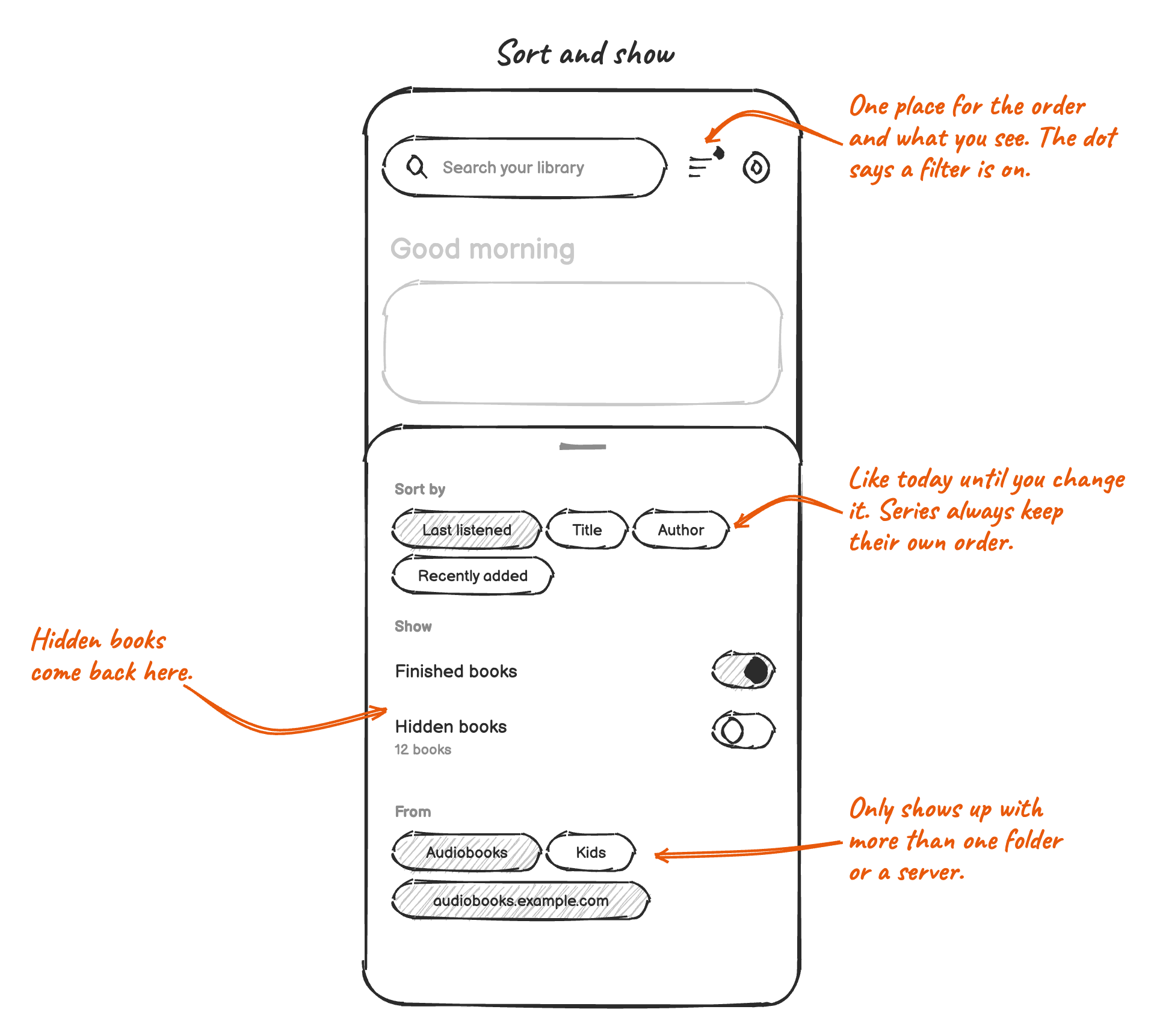
- Sort by: Last listened, Title, Author, Recently added. Last listened is the default and what the library does today. The order applies to Not started yet and Completed, and Current stays in the order it was listened in. Author sorts by author, then by the title or the series' name. Books added before Voice kept the date come last in Recently added.
- A stack sorts by its last listened book, the series' name, its author or its newest book. Inside a stack, the order of the series always holds.
- Show: finished books, hidden books.
- From: one chip per audiobook folder and Audiobookshelf library, only with more than one.
- A dot on the button says a filter is on: finished books are off, or a folder is. Hidden books don't count, because they're hidden on purpose.
- Filtering by author, narrator or genre stays in search.
6. Hiding books
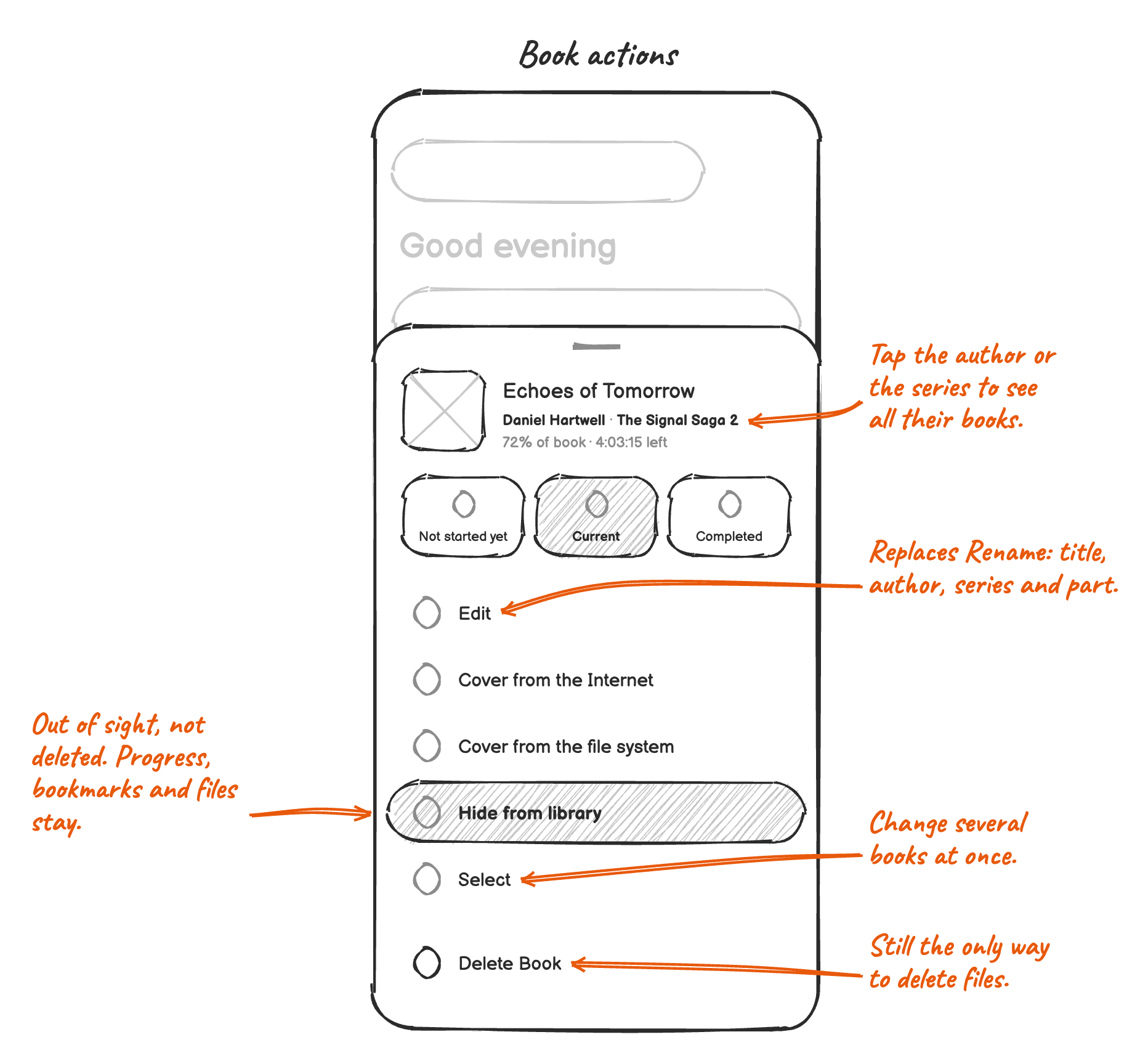
- Hide from library in the book actions, on a series' stack or screen, and for selected books. A snackbar offers to undo it.
- Hidden books leave the library, Continue listening, the Shelf widget and Android Auto. Search still finds them, marked as hidden. The sort sheet shows them again, and the book actions unhide them.
- Progress, bookmarks and files stay, and a scan doesn't bring the book back.
- Hiding syncs through
.voice, like the name does.
7. Editing title, author and series
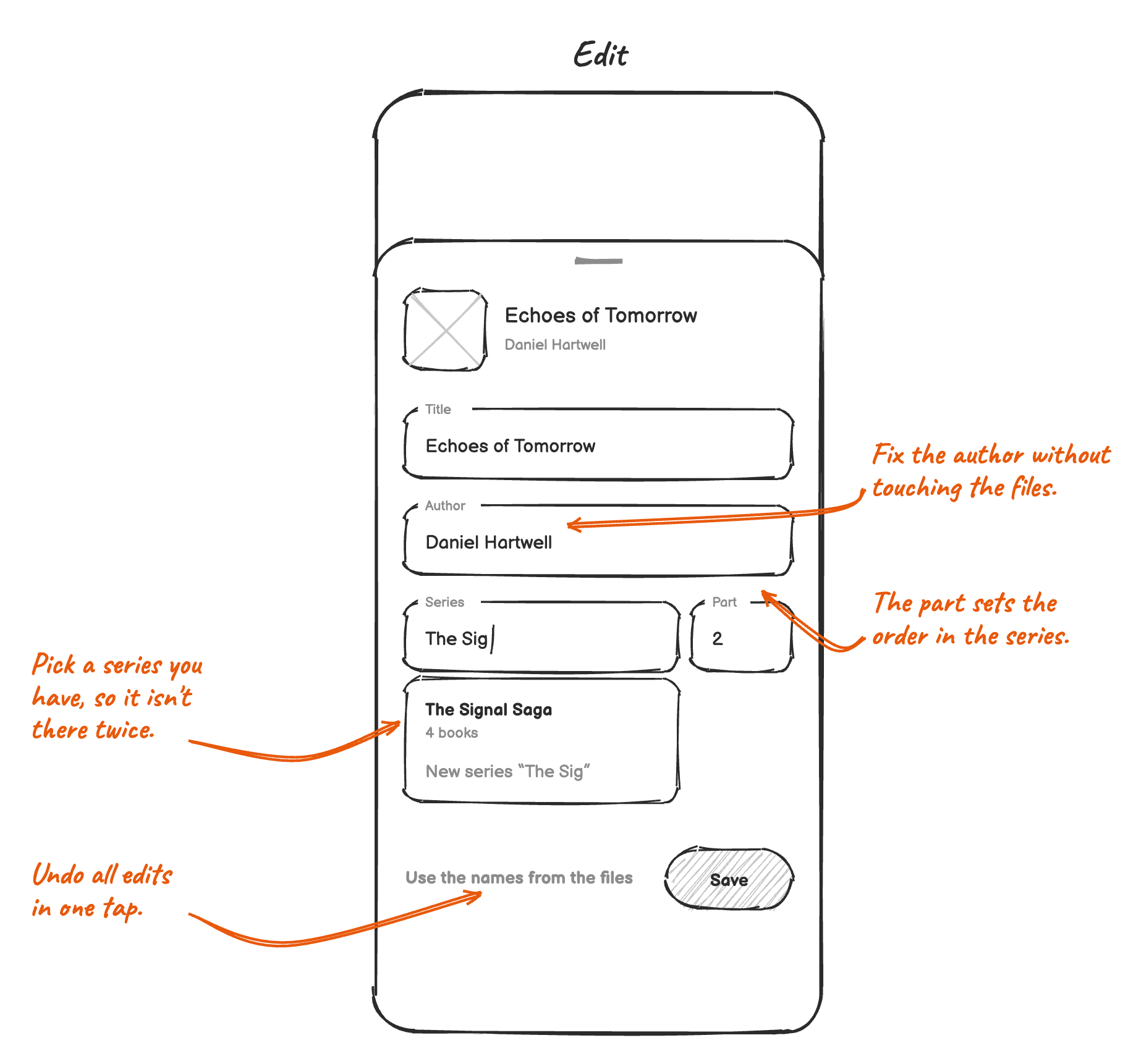
- Edit replaces Rename, with title, author, series and part. The author and series fields suggest the names in the library, so one name isn't there twice.
- "Use the names from the files" undoes all edits.
- Edits stay in Voice and sync through
.voice, like the name does. What wasn't edited still follows the files, so a fixed tag shows up in Voice. - Books from Audiobookshelf are edited on the server, like their title and cover today.
Several books at once
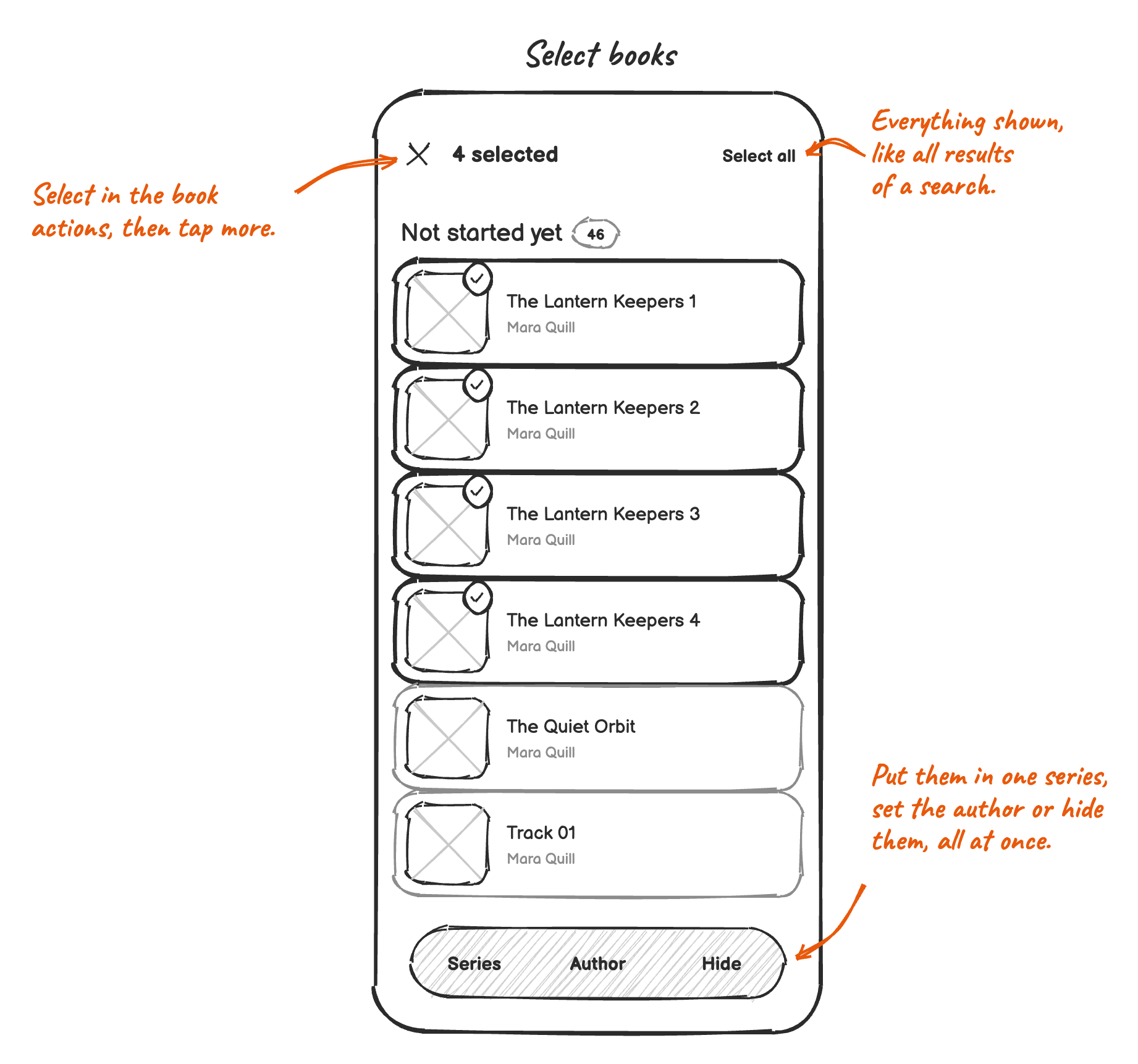
- Select in the book actions starts selecting, because a long press already opens them. A tap adds a book, a tap on a stack all its books, and Select all everything shown.
- Selecting works in the library, on a series, on an author and in search results. To fix a radio play, search for it, select all and set the series.
- Series, Author and Hide change all selected books. Books put in a series follow their folder or file names. Series and Author leave out books from Audiobookshelf, and say how many they left out.
8. The next book in a series
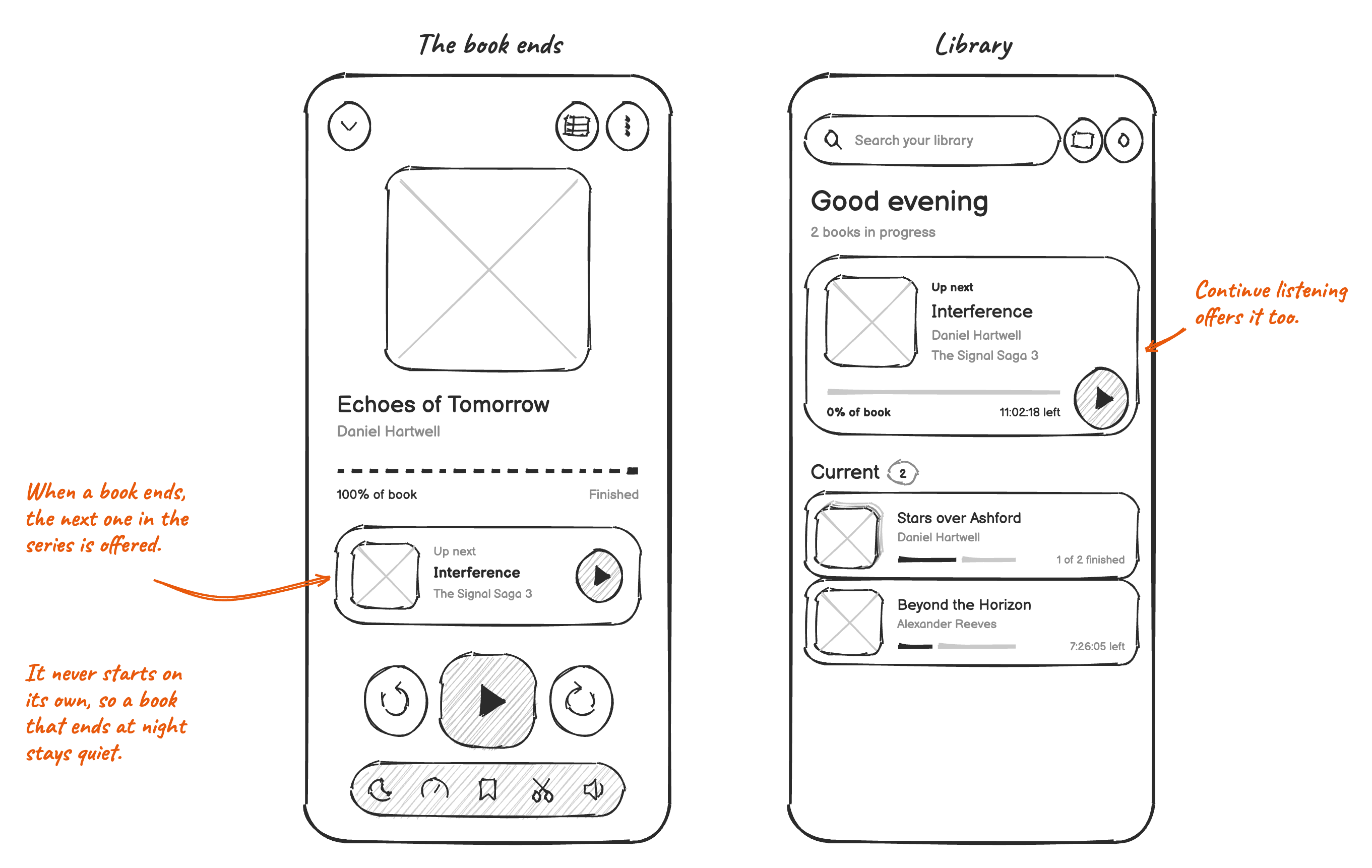
- When a book of a series ends, the player offers the next one: the first unfinished book after it in the series. Finished books are skipped, so a book read on paper only needs to be marked Completed.
- Continue listening in the library offers it too, until another book is started.
9. Search
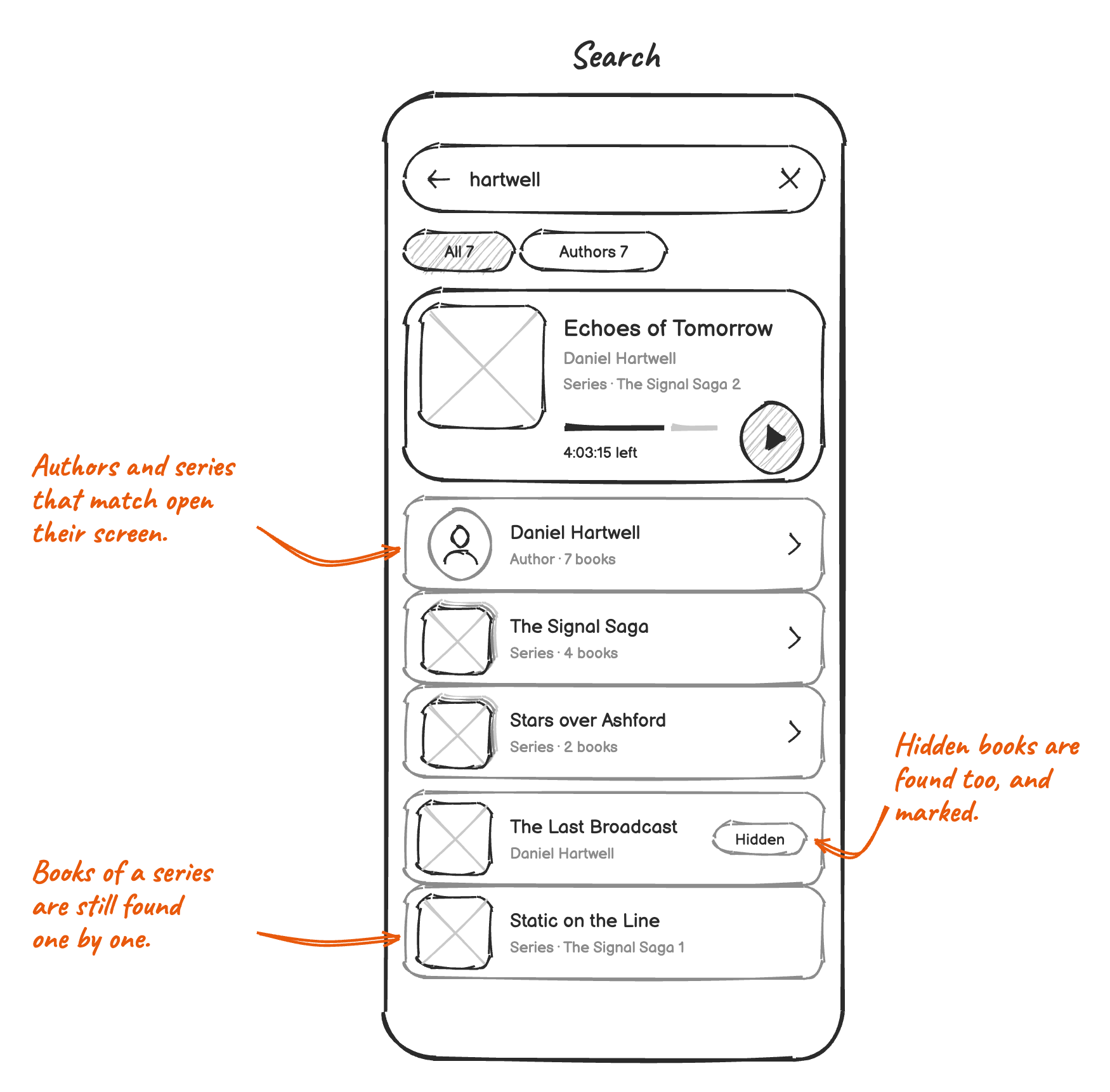
- The best match stays on top and plays in one tap. Authors and series that match come right below it, and open their screen.
- Books are still found one by one, also those in a series and hidden ones.
- Browse opens the author's or the series' screen. Narrators and genres match whole names, so "Stephen King" no longer finds "Stephen Kingsley". A field with several names, like "Fantasy, Young Adult" from Audiobookshelf, matches each of them.
- A series and a part work in one search, so "signal saga 3" puts Interference first. Numbers match as a whole and without leading zeros, so "63" finds "Folge 063" but not "Folge 163".
- Asking Android Auto to play something uses the same search instead of its own. "Play The Signal Saga" plays the book that's next. Chapter names are no longer searched there.
Won't solve
- Author groups in the library: tags are too messy for it, and most authors have a single book. The author screen shows an author's books in one place.
- Writing tags into the files: it could break files, and synced folders would change on every device.
- Putting books in any order by hand: sorting and the order of a series cover what listeners describe.
- Sorting the whole library by file name (#3235): books in a series already follow their file names, and editing fixes the rest.
Left out for now
- Playing the next book on its own. A book that ends while the listener falls asleep would run into the next one.
- Android Auto still lists all books in one list, and neither it nor the widgets offer the next book of a series.
- Books from Audiobookshelf have no
.voicefolder, so they stay hidden only on the device they were hidden on. - Until every device has the update, a split series folder and the long book it was don't sync their places.
- Two series with the same name from different authors become one, and a book in several series only shows in the first one.
- An author tag with several names gets one author screen for all of them. Names in another order, like "Rowling, J. K.", are joined by one rename.
- Folders only become series with "Folders are authors".
- Search doesn't look through chapter names or file names.
Order of work
Each step helps on its own.
- Read series and part from M4B, FLAC and OGG files, from MP3 files as the usual taggers write them, and from the
SERIEStags. - Radio plays and other episodes: each file keeps its own title, and files that share an album become a series.
- "Folders are authors": the folder is the author of books whose tags have none.
- The edit sheet with author, series and part.
- Series stacks in the library and the series screen.
- Offering the next book of a series.
- Series folders with "Folders are authors". It changes which files make a book, so it comes once stacks show the result.
- The author screen.
- Authors and series in search, Browse opening their screen, and numbers in search.
- Hiding books.
- The sort sheet.
- Selecting several books.
- Android Auto using the library search.
Open questions
- Should books from Audiobookshelf be editable in Voice after all?
- Are folders enough as shelves (#1214), or do listeners need shelves they make in Voice?